
Toyota Corolla (E210) 2019-2026 Owners Manual / Driving / Driving procedures / Changing engine switch
modes
Toyota Corolla (E210): Changing engine switch modes
Modes can be changed by pressing the engine switch with brake pedal released. (The mode changes each time the switch is pressed.)
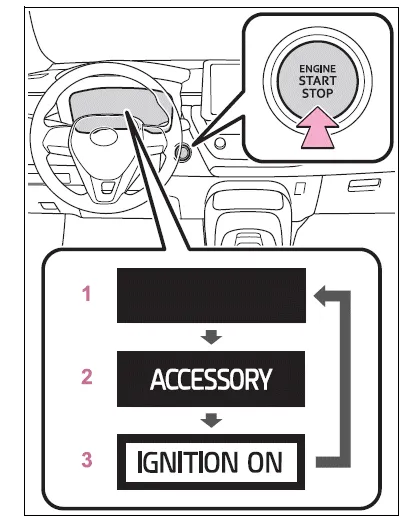
- OFF*1
The emergency flashers can be used. - ACC*2
Some electrical components such as the audio system can be used."ACCESSORY" will be displayed on the multi-information display.
- ON
All electrical components can be used."IGNITION ON" will be displayed on the multi-information display.
*1:If the shift lever is in a position other than P or the shift release button is pressed when turning off the engine, the engine switch will be remained to ON, not to off.
*2:ACC mode can be enabled/disabled on the customize menu.
■Auto power off function
If the vehicle is left in ACC or ON (the engine is not running) for more than 20 minutes with the shift lever is in P or the shift release button is not pressed, the engine switch will automatically turn to OFF.
However, this function cannot entirely prevent battery discharge.
Do not leave the vehicle with the engine switch in ACC or ON for long periods of time when the engine is not running.
■When ACC customization is in off
With the engine switch is turned off, the multimedia system can still be used for a certain time until the battery saving function starts operating.
NOTICE
■To prevent battery discharge
- Do not leave the engine switch in ACC or ON for long periods of time without the engine running.
- If "ACCESSORY" or "IGNITION ON" is displayed on the multi-information display, the engine switch is not off. Exit the vehicle after turning the engine switch off.
When stopping the engine with the shift lever in a position other than P
If the engine is stopped when the shift lever is in a position other than P or the shift release button is pressed, the engine switch will not be turned off. Perform the following procedure to turn the switch off:
1. Check that the parking brake is set.
2. Shift the shift lever to P.
Do not press the shift release button after shifting the shift lever to P.
3. Check that "IGNITION ON" is displayed on the multi-information display and press the engine switch shortly and firmly.
4. Check that "ACCESSORY" or "IGNITION ON" on the multi-information display are off.
NOTICE
■To prevent battery discharge
Do not stop the engine with the shift lever in a position other P or the shift release button pressed. If the engine is stopped with the shift lever in a position other than P or the shift release button pressed, the engine switch will not be turned off and remained to ON.
If the vehicle is left in ON, battery discharge may occur.


Other materials:
Warning lights
Warning lights inform the driver of malfunctions in the indicated vehicle’s systems.
*1: Vehicles without a smart key system:
These lights turn on when the engine switch is turned to the “ON” position to indicate
that a system check is being performed. They will turn off after the engi ...
Operating instructions
Turning the end of the lever turns on the lights as follows:
► Type A
1 The daytime running lights turn
on.
2 The side marker, parking, tail,
license plate, daytime running lights and instrument panel lights turn on.
3 The headlights and all the lights
listed above (except daytime ...
Playing audio CDs and MP3/WMA discs
CD player operation
Insert a disc or press to begin
listening to a disc.
1 Power
2 Volume
3 Eject a disc
4 Repeat play
5 Random playback 6 Select a track/file or display
track/folder list
7 Displays text message
8 Playback
9 Select a folder (MP3/WMA discs only), fast-forward or revers ...